


Tables: from simple grids to nesting
Distinguishing Markdown flavors matters particularly for tables. A GFM pipe table is a relatively simple model with a header row and inline content. Pandoc understands additional table forms and can construct more complex native table structures. An HTML raw block is a different mechanism again.
The following eight examples increase complexity step by step. They demonstrate different source forms rather than merely different visual results. Relevant checks include recognized cells, their spans, the distinction between headers and data, and preservation of block content. S09, S11
The uploaded reference document contains lists, code, images, and nested tables inside cells. These establish publishing requirements, not claims about any particular Markdown parser. The following test cases were created afresh and processed with the Pandoc version recorded in the report. [S00]
Example 31: Pipe table with alignment
GFM, formal profile
Vertical bars separate cells, and a delimiter row separates the header from the body. A colon on the left requests left alignment, on the right requests right alignment, and on both sides requests centering. The three columns demonstrate all variants. Spaces improve source readability but do not determine exact output widths.
SOURCE
| Edition | Language | Copies |
|:--------|:--------:|-------:|
| Print   | English  |    250 |
| EPUB    | English  |    480 |
RENDERED RESULT
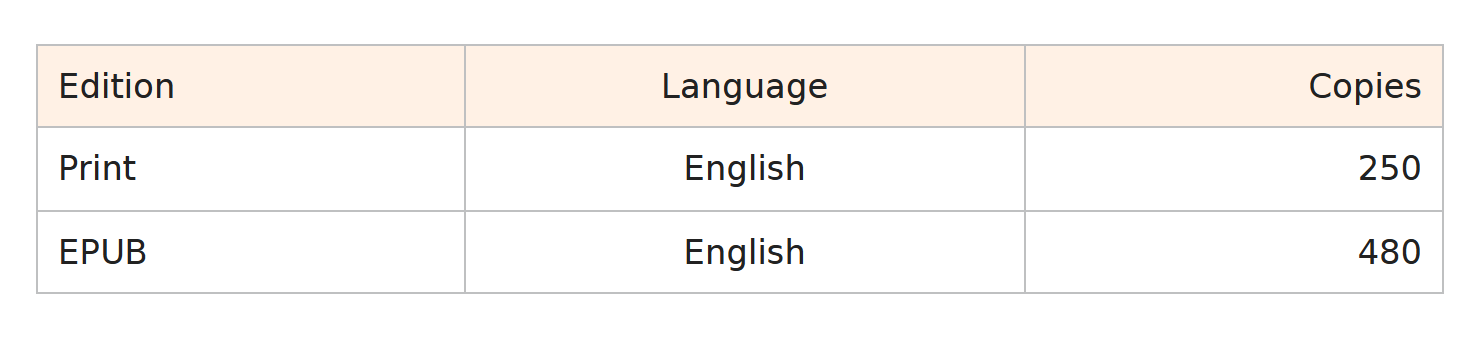
This table form requires a header row. HTML inspection should find real table cells and alignment information. An editor visually aligning the bars is no substitute for a recognized table model. CommonMark without extensions does not recognize this as a table.
Example 32: Formatted cells and a literal pipe
GFM, formal profile
Pipe-table cells can contain inline emphasis, code, and links. The vertical bar in a|b must be backslash-escaped in this GFM table so it does not become a cell boundary. Here that requirement applies even inside backticks.
SOURCE
| Item | Meaning |
|:-----|:--------|
| **Approved** | Ready for release |
| `a\|b` | A literal pipe in code |
| [Manual](https://example.org) | External link |
RENDERED RESULT
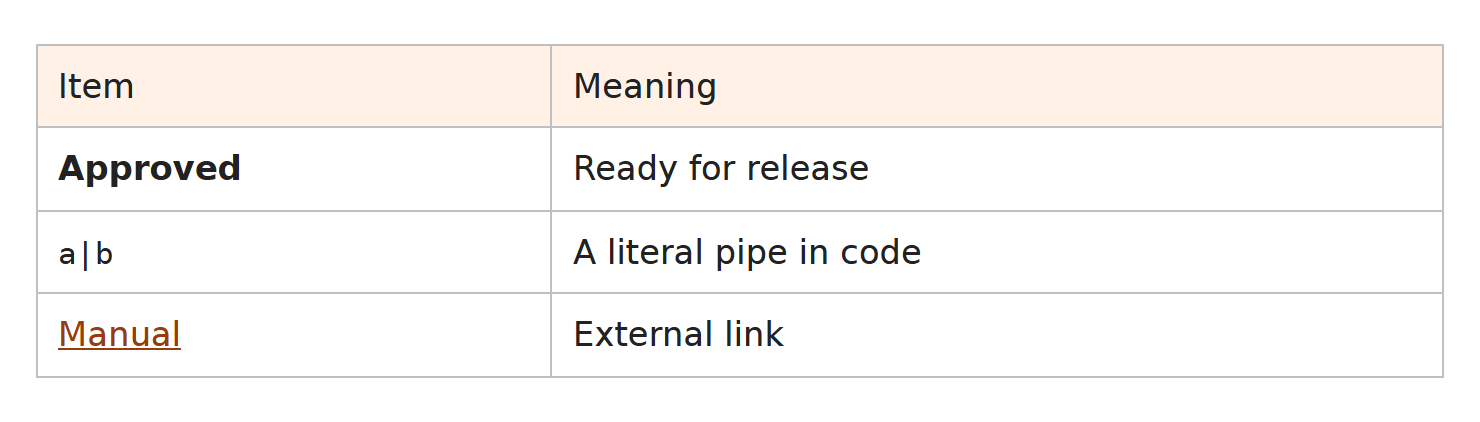
A renderer may wrap a long cell visually. This is not equivalent to putting several paragraphs, a list, or a code block inside the cell. In a pipe table, an additional source line normally starts another row rather than continuing the same cell. Block content needs a different table form.
Example 33: Pandoc simple table
Pandoc Markdown
Simple tables use aligned text columns and hyphen runs instead of vertical cell boundaries. The first column is left-aligned and the second right-aligned here. Header placement relative to the separator lines participates in interpretation. A final rule followed by a blank line makes the table ending clear.
SOURCE
Edition      Copies
----------- -------
Print           250
EPUB            480
----------- -------
RENDERED RESULT
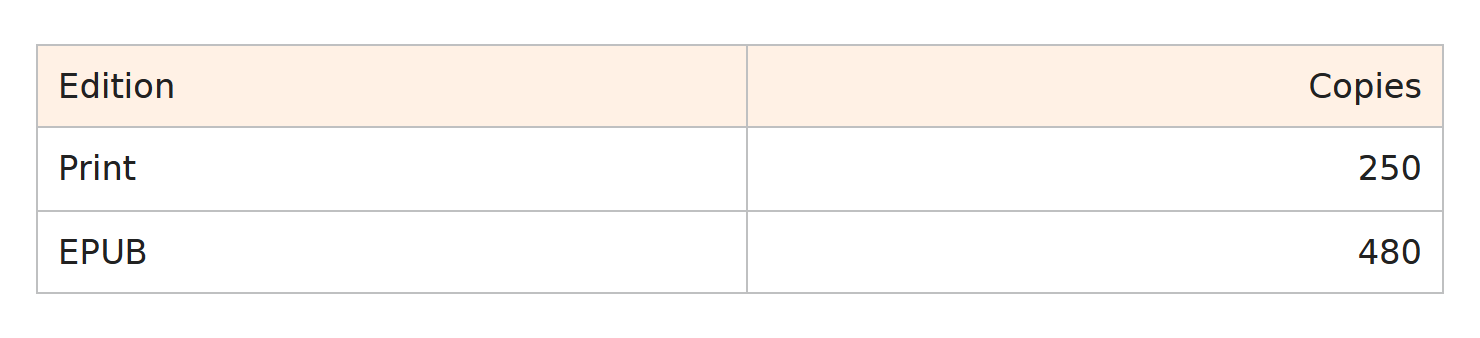
This notation is more sensitive to whitespace changes than a pipe table. Proportional fonts or automatic reformatting can make the source difficult to maintain. Simple tables suit short, single-line cell contents rather than arbitrary editorial blocks.
Example 34: Multiline table cells
Pandoc Markdown
A multiline table lets a cell's text extend across several source lines. Blank lines separate the two data records in this specimen. Top and bottom rules and carefully aligned columns help the parser recognize the structure.
SOURCE
--------------------------------------------
Edition      Editorial note
-----------  -------------------------------
Print        Includes a revised
             introduction.

EPUB         Includes accessible
             navigation.
--------------------------------------------

Table: Notes for each edition.
RENDERED RESULT
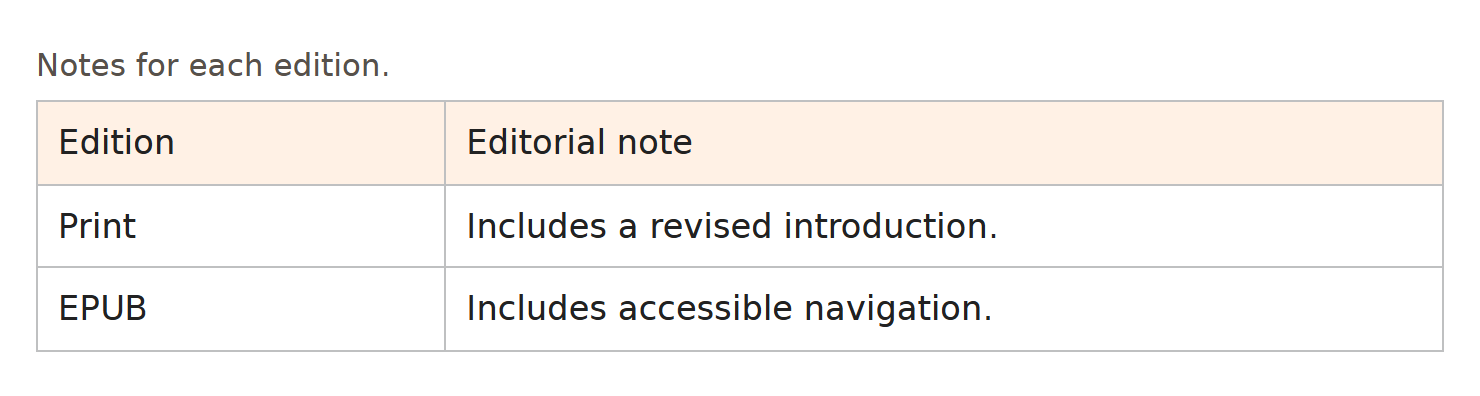
The physical source lines within a cell do not become independent paragraphs, nor do they create row or column spans. The Table: line produces a caption through Pandoc's caption extension. A plain pipe table and a captioned multiline table are therefore different syntaxes, not simply different visual treatments.
Example 35: Grid table with a list and paragraph
Pandoc Markdown
Grid tables draw boundaries with plus signs, hyphens, and vertical bars. Equals signs separate the head from the body. The right-hand cell contains a real list followed by a paragraph. This makes the form substantially more expressive than a pipe table.
SOURCE
+-------------+--------------------------+
| Edition     | Review tasks             |
+=============+==========================+
| Print       | - Check the cover.       |
|             | - Check the references.  |
|             |                          |
|             | Approval is required.    |
+-------------+--------------------------+
RENDERED RESULT
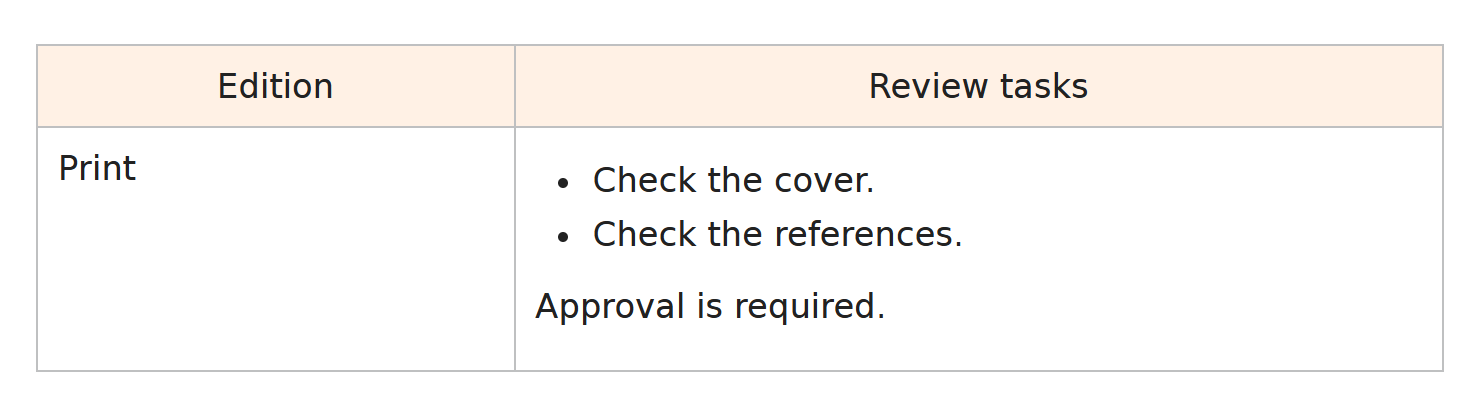
Vertical boundaries must remain precisely aligned. A misplaced bar can produce extra columns or a different cell structure without stopping conversion. The test therefore checks not just for a table but for a list inside a data cell.
Example 36: Spanning cells in a grid table
Pandoc Markdown
The "Publication" header cell spans two logical columns. The "Guide" cell spans two rows. Interruptions in the drawn boundaries express those spans. HTML represents them using colspan and rowspan.
SOURCE
+---------------------+----------+
| Publication         | Copies   |
+=============+=======+==========+
|             | Print | 200      |
| Guide       +-------+----------+
|             | EPUB  | 450      |
+-------------+-------+----------+
RENDERED RESULT
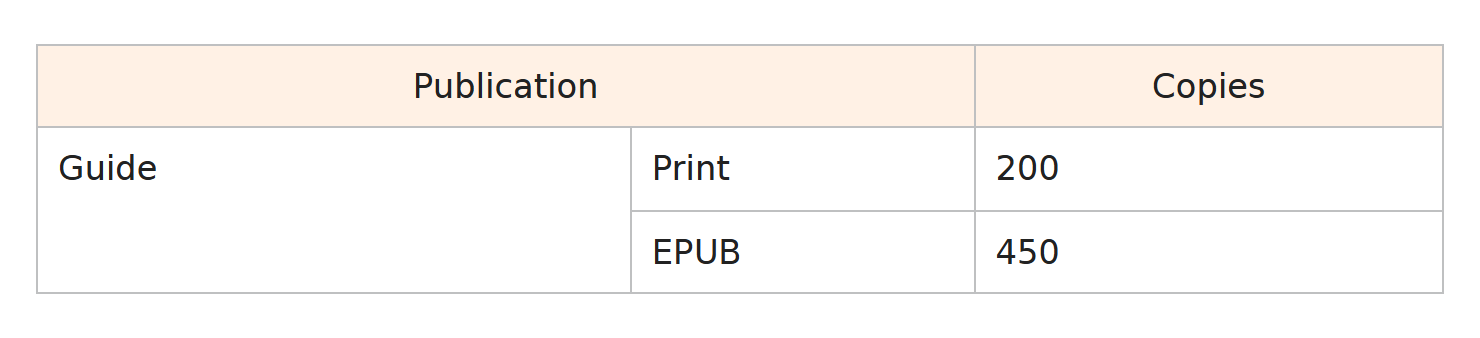
The blanket statement "Markdown cannot merge cells" would therefore be wrong. It applies to simple GFM pipe tables, not to every extended Markdown dialect. Exact parser and writer versions and the target format still matter. The tests check actual span values here; merely creating an output file would not be enough.
Example 37: HTML table with explicit semantics
Pandoc Markdown
The {=html} attribute explicitly marks the whole block as raw HTML output. caption and scope carry information about the caption and header cells. HTML output can preserve that information.
SOURCE
```{=html}
<table>
  <caption>Edition totals</caption>
  <tr><th scope="col">Edition</th><th scope="col">Copies</th></tr>
  <tr><th scope="row">Print</th><td>250</td></tr>
</table>
```
RENDERED RESULT

This is deliberately a boundary case: an HTML RawBlock is not a native Pandoc table. Writing DOCX does not automatically turn it into a Word table; the entire block may disappear. Parsing HTML with an HTML reader is a different processing route. The report therefore distinguishes successful HTML presentation from missing portable structure.
Example 38: A table inside a table cell
Pandoc Markdown
A grid cell can contain further block structures. This specimen uses that capability for an inner grid table. The document tree and a table nested within an HTML data cell reveal whether the intended nesting was actually recognized.
SOURCE
+----------+-----------------------------+
| Topic    | Details                     |
+==========+=============================+
| Editions | +----------+--------+       |
|          | | Format   | Copies |       |
|          | +==========+========+       |
|          | | Print    | 250    |       |
|          | +----------+--------+       |
+----------+-----------------------------+
RENDERED RESULT
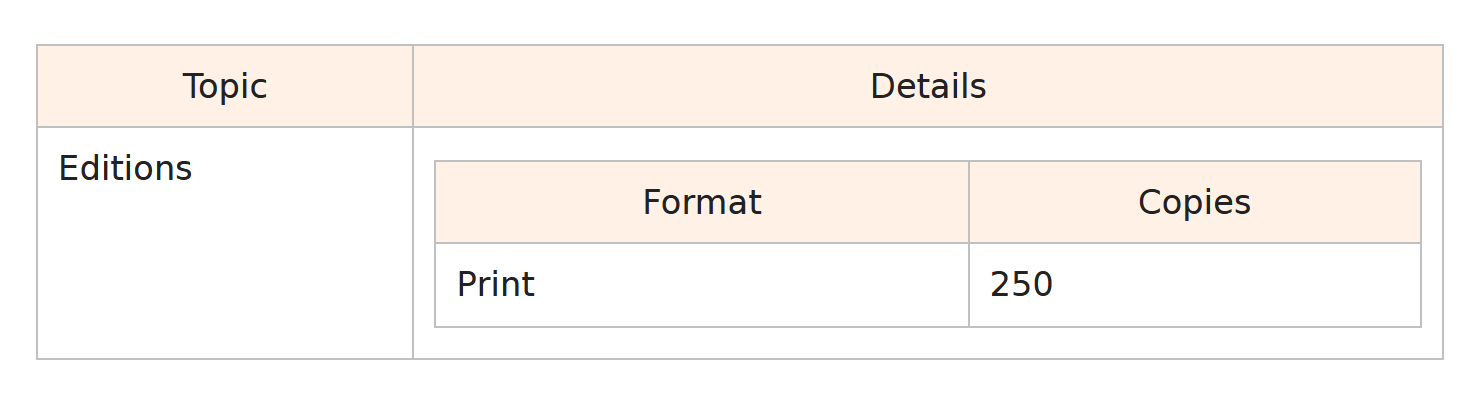
Technical representability does not automatically mean convenient authoring or accessibility. This source is much harder to edit than a simple table. Production must also check whether nesting remains useful in DOCX, EPUB, and print. For more complex collections, an explicit HTML or XML table model can be a better editable source.
A "protected table" can mean two different requirements. Editing or copying restrictions are application or output-format features, not Markdown table syntax. Keeping a table together in print is instead a layout requirement. CSS such as break-inside: avoid can discourage breaks, but cannot guarantee that a table taller than a page will remain intact. Repeated headers, column widths, and page breaks need checking in the selected output process.
Complex tables should not be classified simply as "possible" or "impossible". Ask which structure the input syntax can express, whether the reader recognizes it correctly, and whether the selected writer preserves the required semantics.