


Validating XML with XSLT in the Browser
When XSLT can be a practical alternative to Schematron
Schematron is one of the most useful technologies for expressing business rules and semantic constraints in XML documents. It is especially strong when validation rules need to be maintained independently from presentation and when standardized validation reports are required.
But not every environment provides a Schematron processor, an XML editor, a command-line tool, or a server-side validation service. In some projects the requirement is much simpler: an XML document should be opened by a user and immediately displayed together with understandable validation messages.
For this type of scenario, XSLT can be a surprisingly effective solution.
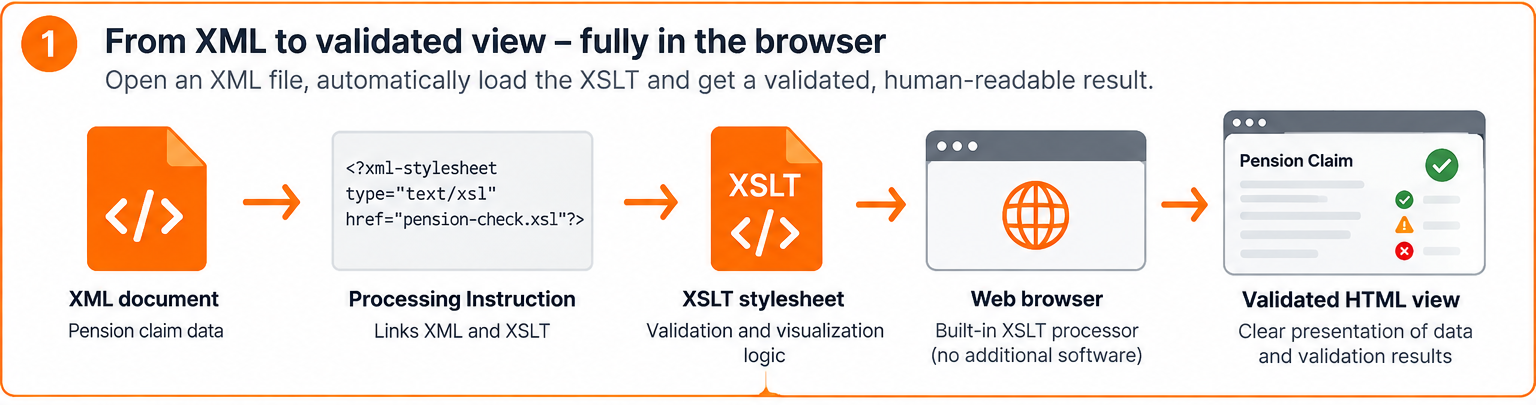
An XML document can reference an XSLT stylesheet through an xml-stylesheet processing instruction. When the XML file is opened in a browser with built-in XSLT support, the browser loads the stylesheet, transforms the XML into HTML, and displays the result. The same stylesheet can also evaluate validation rules and present errors, warnings, and informational messages directly next to the data.
The result is a lightweight validation application built from XML and XSLT alone.
Content:
- The basic idea
- A fictional pension claim example
- Why use XSLT instead of Schematron?
- Validation and visualization in one stylesheet
- Error, warning, and information levels
- A small application without an application server
- Why XSLT 1.0 matters here
- XSLT validation and Schematron are not competitors
- What the downloadable example contains
- Conclusion
- Download: Example Files
The basic idea
The XML document contains a processing instruction such as:
<?xml-stylesheet type="text/xsl" href="pension-check.xsl"?> The browser then performs four steps automatically:
1. It opens the XML document.
2. It reads the xml-stylesheet processing instruction.
3. It loads the referenced XSLT stylesheet.
4. It transforms the XML into an HTML page.
The XSLT does not have to be limited to presentation. It can also contain rules that inspect the XML content.
For example:
<xsl:if test="not(applicant/email) or not(contains(applicant/email, '@'))">
  <div class="message error">
    A valid email address is required.
  </div>
</xsl:if>
The rule is executed during transformation. If the condition is true, the generated HTML contains a validation message.
This means visualization and validation happen in one processing step.
A fictional pension claim example
For the downloadable example we use a fictional organization called Northbridge Pension Services. The example deliberately does not reproduce the appearance, terminology, identifiers, or data model of any real pension authority.
The XML contains a pension claim with data such as:
• claim identifier
• applicant name
• date of birth
• email address
• requested retirement date
• pension type
• contribution periods
• total contribution months
A simplified extract looks like this:
<pensionClaim id="NB-2026-0042">
  <applicant>
    <firstName>Alex</firstName>
    <lastName>Johnson</lastName>
    <dateOfBirth>1965-04-12</dateOfBirth>
    <email>alex.johnson@example.org</email>
  </applicant>
  <requestedRetirementDate>2030-05-01</requestedRetirementDate>
  <pensionType>old-age</pensionType>
  <contributionHistory>
    <period from="1990-01" to="1999-12" type="employment" months="120"/>
    <period from="2000-01" to="2010-12" type="self-employed" months="132"/>
    <period from="2011-01" to="2020-12" type="employment" months="120"/>
  </contributionHistory>
</pensionClaim>
The stylesheet can evaluate rules such as:
• Is a claim ID present?
• Are first name and last name present?
• Does the email address contain an @ character?
• Is the requested retirement date after the applicant's date of birth?
• Are contribution periods complete?
• Are there unexplained gaps between contribution periods?
• Is the requested retirement date unusually far in the future?
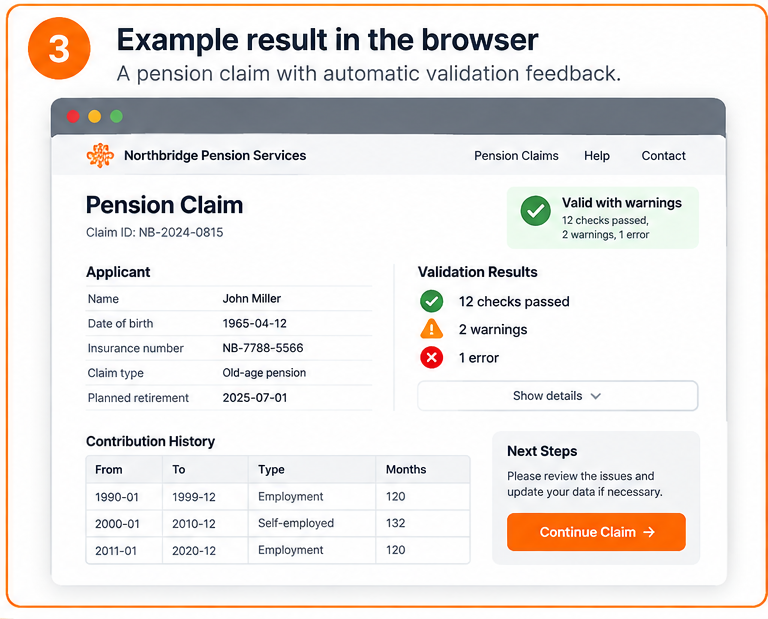
The browser output can then group the results into passed checks, warnings, and errors.
Why use XSLT instead of Schematron?
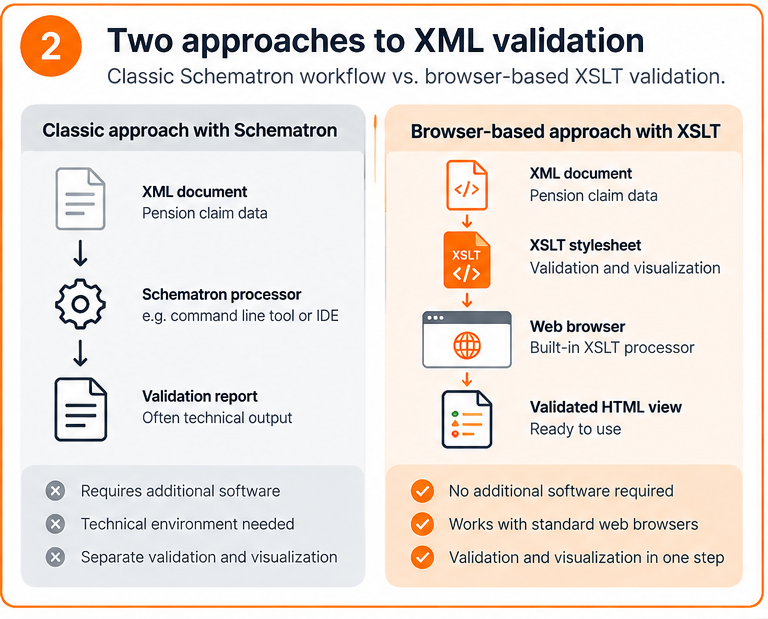
The point is not to replace Schematron in general. The two technologies solve different problems and often complement each other.
Schematron is usually the better choice when validation is a formal part of a processing chain, when rules need to be portable between systems, when SVRL output is required, or when validation should remain independent from presentation.
XSLT becomes attractive when the primary requirement is an immediately usable browser view and there is no dedicated validation environment available.
A browser-based XSLT solution has several practical advantages:
• no dedicated XML editor is required for the end user
• no separate Schematron processor is required
• validation messages can be written for non-technical users
• the original XML remains the source document
• visualization and checking can be delivered in one stylesheet
• the solution can be distributed as a small package of XML, XSLT, CSS, and optional assets
This can be useful for prototypes, internal review workflows, data handover, demonstrations, offline packages, quality-control samples, and situations in which users should be able to inspect structured data without installing specialist software.
Validation and visualization in one stylesheet
A typical stylesheet can first calculate validation states and then render both the document and the messages.
For example:
<xsl:variable name="emailValid"
              select="contains(applicant/email, '@')"/>
<xsl:choose>
  <xsl:when test="$emailValid">
    <div class="check passed">Email address looks valid.</div>
  </xsl:when>
  <xsl:otherwise>
    <div class="check error">Email address is invalid.</div>
  </xsl:otherwise>
</xsl:choose>
The same stylesheet can produce a summary at the top of the page and detailed messages further down.
A user therefore sees the content and the validation result in the same interface.
Error, warning, and information levels
Not every failed rule should stop processing. A useful validation interface distinguishes between different levels.
Error
An error indicates that the data is inconsistent or incomplete and should normally be corrected before further processing.
Example:
The requested retirement date must be after the applicant's date of birth.
Warning
A warning identifies a suspicious condition that may be valid but deserves review.
Example:
Contribution history contains an unexplained gap of more than 24 months.
Information
An informational message confirms a condition or provides additional context.
Example:
All required personal data is present.
The important point is that these messages are generated from the XML itself. The user does not have to read XPath expressions or technical validation reports.
A small application without an application server
From the end user's perspective, the workflow can be extremely simple:
1. Receive the XML file and its stylesheet.
2. Open the XML file in a supported browser, usually through the supplied local server starter for Chrome and Edge.
3. Review the formatted document and validation messages.
No dedicated Schematron application is required.
However, browser behavior must be tested carefully. Browser-integrated XSLT processors are generally based on XSLT 1.0, and security rules for local files can differ between browser versions and operating systems. In current Chrome and Edge, a directly opened file:// XML document is not allowed to load its neighboring XSLT file; the example therefore serves the folder through a small local HTTP server.
For that reason, the downloadable example should be tested against the browsers intended for the project and should document the supported execution method.
Why XSLT 1.0 matters here
Modern XSLT processors support XSLT 2.0, 3.0, XPath 3.1, regular expressions, advanced grouping, maps, arrays, and many other powerful features.
A standard browser's built-in XSLT engine normally does not provide this modern feature set. A browser-only example should therefore remain within the subset that is actually supported by the target browsers, typically XSLT 1.0.
That restriction influences rule design. Complex date arithmetic, schema-aware processing, advanced string handling, and reusable validation frameworks are easier with a dedicated processor.
This is one of the main boundaries of the approach.
XSLT validation and Schematron are not competitors
Schematron expresses assertions directly:
<sch:assert test="contains(email, '@')">
  A valid email address is required.
</sch:assert>
XSLT expresses the same idea procedurally:
<xsl:if test="not(contains(email, '@'))">
  <div class="error">A valid email address is required.</div>
</xsl:if>
Schematron makes the rule itself the primary artifact. XSLT makes the generated result the primary artifact.
That distinction is important.
Choose Schematron when you need a formal, reusable validation layer. Choose browser-based XSLT when a self-contained, human-readable inspection tool is the more important requirement.
In larger systems it is also possible to use both: Schematron for formal validation and XSLT for presentation.
What the downloadable example contains
The executable package accompanying this article includes:
• pension-valid.xml
• pension-errors.xml
• pension-check.xsl
• a short README with browser instructions
• start-demo.cmd and start-demo.ps1 as the Windows run package for Chrome and Edge
• screenshots from tested browsers
The run package starts a small local HTTP server with PowerShell and opens the XML examples through localhost. This is important for Chrome and Edge because their security model blocks the neighboring XSLT file when the XML is opened directly from the file system.
The valid document demonstrates a clean result. The error document intentionally triggers several different validation messages.
Conclusion
Schematron remains an excellent technology for semantic XML validation. But it is not the only way to check structured XML data.
When the goal is to deliver a lightweight validation view that can be opened by a user without dedicated XML validation software, XSLT can combine validation and visualization in a particularly practical way.
The XML document references the stylesheet. The browser loads the XSLT. The stylesheet checks the data and transforms it into a readable HTML interface. The user sees the original information together with validation results without needing a dedicated XML validation application.
For the right scenario, this is not a workaround. It is a deliberately simple architecture.
Download: Example Files
In the Download folder, you will find all example files for this article.